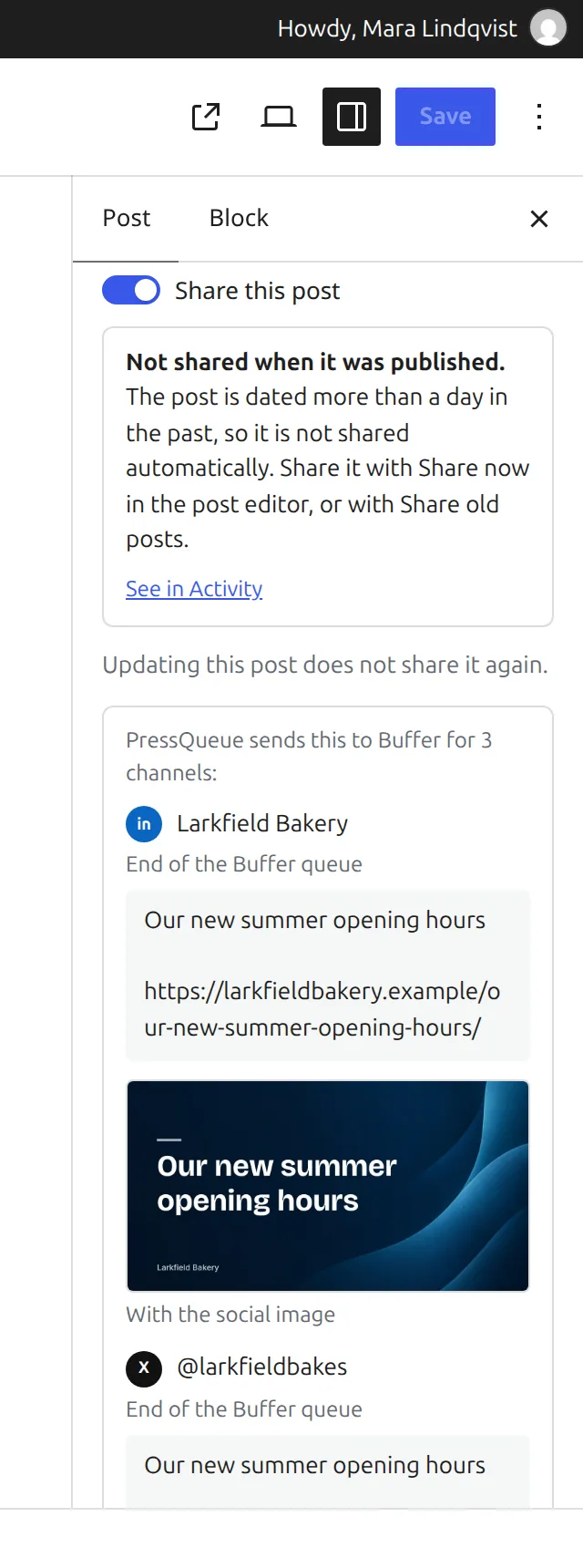
"Share now" is a button in the "Social sharing" panel of the editor. It shares one published post right from the editor, after showing you what each channel would get.
When the button appears
The button shows up for a post that is published, is not password-protected and has no PressQueue share yet. "Share this post" must be on. Otherwise the panel says "Switch sharing on and update the post to share it now." If you have unsaved changes, it says "Update the post first to share it now."
Share now uses the rules that take part in Share old posts, so at least one rule needs "I pick old posts in Share old posts" ticked. The quick start rule has it. Without such a rule, PressQueue says "No rule takes part in Share old posts yet."
What happens
- Click "Share now". PressQueue checks the post against your rules.
- The preview lists each channel with its message and whether it goes out with "Text and link", "With image" or "With the social image". Channels that are left out show the reason, for example "Not sent to LinkedIn: The channel is switched off."
- Click "Confirm and share". The shares are added, and the panel says "Shared. It shows up here in a moment."
In test mode the preview says "Test mode is on, so nothing goes to Buffer. PressQueue would record this as a test run:". When PressQueue is paused, the shares wait until sharing resumes.
If the post, a rule or a channel changes between the preview and your confirmation, PressQueue asks you to click "Share now" again.
Good to know
- Share now is the way to share a post dated more than a day in the past. Such posts are not shared automatically when they are published.
- "Post right away" and "Top of the Buffer queue" only work for one channel at a time. If the rule uses one of them and the post goes to several channels, pick another timing under "Customize for this post", update the post and try again.
- "Never share" rules still apply.